Key takeaways
- Designs.ai is a broad AI creative platform that generates images, videos, slides, audio, copy and design assets from one brief.
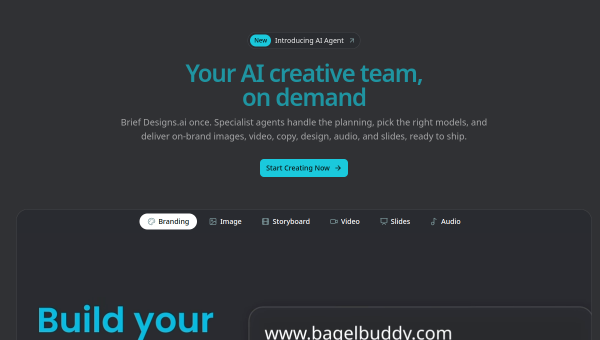
- Specialist AI agents handle branding, imagery, video, slides and audio, with smart routing to the best model per task.
- It enforces brand guidelines automatically and uses a conversational interface that asks clarifying questions.
- Best for creative teams and enterprises producing multi-format campaign assets; broader than a logo maker.
What Designs.ai is
Designs.ai began in the logo and graphics space and has grown into a broad AI creative platform. Today it generates on-brand marketing assets across many formats — images, videos, slides, audio, copy and design — from a single brief, using a set of specialist AI agents rather than one general tool. It is used by large enterprises and creative teams, and its pitch is streamlining the production of complete campaign assets: describe what you need, and the relevant agents produce coordinated, brand-consistent outputs.
That multi-format, agent-based scope distinguishes it from single-purpose logo or image tools. Designs.ai aims to be a creative hub where a marketing team can generate everything a campaign needs — visuals, video, slides, audio, copy — in one place, with brand consistency enforced across all of it.
The AI features
Designs.ai uses specialist agents for branding, imagery, storyboards, video, slides and audio, and routes each task automatically to the model best suited for it (or lets you choose). A conversational interface understands natural-language briefs and asks clarifying questions, which helps produce more on-target results than a blank prompt. Brand consistency is enforced automatically across outputs, so assets from different agents share a coherent look. The result is a single brief turning into a coordinated set of multi-format assets.
The smart model routing and brand enforcement are the standout features — they address two real problems: choosing the right model and keeping outputs consistent. As with all generative tools, review everything before use: check copy for accuracy, images and video for quality and any artefacts, and ensure the outputs genuinely fit your brand and licensing needs. The agents accelerate production; human review keeps quality and accuracy up.
Strengths and limits
The strengths are breadth and consistency. Generating images, video, slides, audio and copy from one brief — with automatic brand enforcement and model routing — is powerful for teams producing lots of campaign material, and the enterprise adoption lends credibility. For multi-format needs, it is more efficient than stitching together separate tools.
The limits: breadth means no single format is as deep as a dedicated specialist tool, and generalist output still needs human refinement to stand out. It is aimed more at teams and enterprises than casual solo users seeking just a logo, so evaluate whether its scope matches your needs. Confirm licensing and quality on generated assets before publishing.
Who it suits
- Creative and marketing teams producing multi-format campaign assets.
- Enterprises that need brand-consistent output across images, video and copy.
- Users who want one platform and interface for varied creative tasks.
Verdict
Designs.ai has grown from a logo tool into a broad AI creative platform that generates images, video, slides, audio and copy from a single brief, using specialist agents with automatic brand consistency and smart model routing. That makes it a strong fit for creative teams and enterprises producing lots of multi-format campaign material in one place. No single format is as deep as a dedicated tool, and its output needs human review and licensing checks, but for streamlined, brand-consistent, multi-format creative production, Designs.ai is a capable and modern choice.
Top Designs.ai alternatives
Other hand-reviewed Branding tools worth comparing against Designs.ai.
BrandmarkPaid
Brandmark is a paid AI branding and business tool for brand creators. Our review covers what it does,…
DesignEvoFreemium
DesignEvo is a freemium AI branding and design tool for brand creators. Our review covers what it does,…
FreeLogoDesignFreemium
FreeLogoDesign is a freemium AI branding and design tool for brand creators. Our review covers what it does,…
LogoAIPaid
LogoAI is a paid AI branding and business tool for brand creators. Our review covers what it does,…
LogoMakrFreemium
LogoMakr is a freemium AI branding and design tool for brand creators. Our review covers what it does,…
LookaFreemium
Looka is an AI-powered design, branding tool designed to help users work faster and produce better results.
Are you the maker of Designs.ai?
Show visitors this review with the badge below. Copy the code into your site or press kit; it links straight back to this page.



