
Key Takeaways
- Numerous brings AI into Google Sheets and Excel.
- A simple =AI() function runs prompts across your spreadsheet rows.
- It classifies, generates, summarizes, and extracts data at scale.
- Great for anyone doing bulk text tasks in spreadsheets.
Numerous does one clever thing exceptionally well: it puts AI inside your spreadsheet as a formula. With a simple =AI() function, you can run a prompt across thousands of rows — categorizing feedback, writing product descriptions, extracting data from messy text, summarizing entries — and drag it down like any other formula. For anyone who lives in Google Sheets or Excel and faces repetitive text work, it turns hours of manual effort into a single fill-down.
What is Numerous?
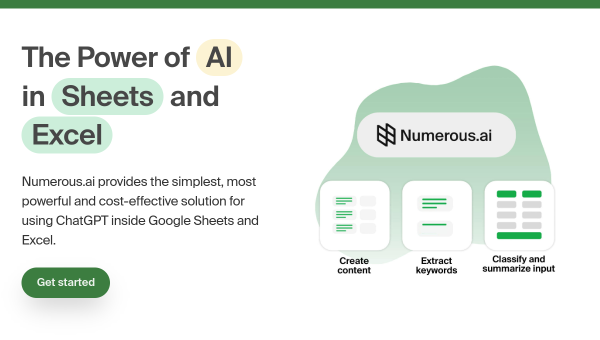
Numerous is a tool that integrates AI directly into spreadsheets — Google Sheets and Microsoft Excel — via a custom function (such as =AI() or NUMEROUS-style formulas). Instead of copying data in and out of a chatbot, users write a prompt inside a cell and apply it across rows and columns like any spreadsheet formula, so AI runs at scale over their data. Common uses include classifying and categorizing data (tagging feedback, sorting leads), generating text (product descriptions, ad copy, email drafts per row), extracting and structuring information from unstructured text, summarizing content, sentiment analysis, and formula or data cleanup help. Because it works within the spreadsheet, it fits naturally into workflows people already use, and results populate cells that can be further manipulated with normal spreadsheet tools. It targets marketers, analysts, ecommerce sellers, researchers, and anyone doing bulk text or data tasks in spreadsheets. Numerous offers a free tier with paid plans for more usage. (AI outputs should be reviewed, as with any generative tool.)
What it does well
- AI as a formula: run prompts across rows with =AI().
- Scale: process thousands of rows in one fill-down.
- Versatile: classify, generate, extract, and summarize.
- Fits your workflow: works in Sheets and Excel.
Who it is for
Numerous fits marketers, analysts, ecommerce sellers, researchers, and anyone who works in Google Sheets or Excel and faces repetitive text or data tasks at scale — categorizing feedback, writing per-row descriptions, extracting data from messy text, summarizing. Its formula-based approach means no new app to learn: if you can write a spreadsheet formula, you can use it. Those without bulk spreadsheet work may not need it, AI outputs should be reviewed for accuracy, and heavier usage requires a paid plan. For AI-powered bulk work in spreadsheets, Numerous is a genuinely handy, free-to-start choice.
Things to keep in mind
- AI outputs should be reviewed for accuracy, especially at scale.
- Its value depends on having bulk spreadsheet tasks to run.
- Heavier usage requires a paid plan.
Our verdict
Numerous does one clever thing exceptionally well: it turns AI into a spreadsheet formula. With a simple =AI() function you write a prompt in a cell and apply it across thousands of rows — classifying feedback, generating per-row descriptions, extracting data from messy text, summarizing — then drag it down like any formula, all inside Google Sheets or Excel. For anyone who lives in spreadsheets and faces repetitive text work, that turns hours into a single fill-down, with no new app to learn. Outputs need reviewing and heavier use is paid, but for bulk AI work in spreadsheets, Numerous is an excellent, free-to-start choice.
Frequently asked questions
What is Numerous?
Numerous integrates AI into Google Sheets and Excel via a custom function (such as =AI()), letting you run prompts across spreadsheet rows to classify, generate, extract, and summarize at scale.
How does Numerous work?
You write a prompt inside a cell and apply it across rows like any formula, so AI runs over your data at scale, populating cells you can then manipulate with normal spreadsheet tools.
Is Numerous free?
Numerous offers a free tier, with paid plans for more usage.
Who is Numerous for?
It is for marketers, analysts, ecommerce sellers, researchers, and anyone doing bulk text or data tasks in Google Sheets or Excel.
Top Numerous alternatives
Other hand-reviewed AI Data Analysis tools worth comparing against Numerous.
AkkioFreemium
Akkio is a freemium AI data tool. Our hands-on review covers features, pricing, pros and cons, and who…
BasedashFree Trial
Basedash is a free trial AI data tool. Our hands-on review covers features, pricing, pros and cons, and…
ChartpixelFree Trial
Chartpixel is a free trial AI data tool. Our hands-on review covers features, pricing, pros and cons, and…
CoefficientFreemium
Coefficient is a freemium AI data tool. Our hands-on review covers features, pricing, pros and cons, and who…
DeepnoteFree
Deepnote is a free AI data tool. Our hands-on review covers features, pricing, pros and cons, and who…
Formula BotFreemium
Formula Bot is a freemium AI data tool. Our hands-on review covers features, pricing, pros and cons, and…
Are you the maker of Numerous?
Show visitors this review with the badge below. Copy the code into your site or press kit; it links straight back to this page.