
Key Takeaways
- Lovable is an AI app builder that creates apps and websites from a chat conversation.
- You describe your idea (or share a screenshot) and it generates a working app.
- It offers templates, one-click deployment, integrations, and collaboration.
- Great for fast prototypes and simple apps; complex production apps still need developers.
Lovable lets you build apps and websites simply by chatting with AI. Describe what you want — or hand it a screenshot — and it generates a working prototype in real time that you can refine and deploy. It has become one of the most popular “vibe coding” tools, making app creation accessible to people who cannot or would rather not write code.
What is Lovable?
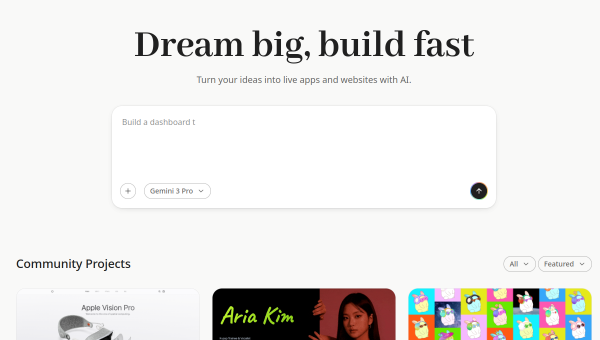
Lovable is an AI-powered application builder that turns natural-language descriptions into working apps and websites. You chat with the AI about your vision, or provide screenshots, and it generates functional prototypes in real time, which you then refine through further conversation. It offers a template library for quick starts across use cases like e-commerce, portfolios, and SaaS tools, one-click deployment, integration connectors, and collaborative features suited to designers, product managers, marketers, and developers alike. The platform emphasizes going from concept to deployed app quickly, and it reports very large adoption with millions of projects built. It offers a free tier with limited usage plus paid plans that add more capacity and features.
What it does well
- Chat-to-app: build working apps by describing them in plain language.
- Fast prototyping: generate and refine functional apps in real time.
- Templates and deploy: quick starts plus one-click deployment.
- Accessible: lets non-developers create real, working software.
Who it is for
Lovable suits founders, designers, product managers, marketers, and hobbyists who want to build apps and websites quickly without deep coding — ideal for prototypes, MVPs, internal tools, and simple products. It is a great way to validate ideas fast. For complex, large-scale production applications with demanding requirements, experienced developers are still needed, and AI-generated code should be reviewed, but for accessible, rapid app building, Lovable is a standout.
Things to keep in mind
- AI-generated apps still need review, especially for security and scaling.
- Complex, production-grade software may outgrow what chat-to-app can handle.
- Usage runs on credits/messages, so heavier building requires paid plans.
Our verdict
Lovable is one of the most impressive AI app builders, turning a simple conversation into a working, deployable app and putting real software creation within reach of non-developers. Templates, one-click deployment, and collaboration make it practical for prototypes, MVPs, and simple products, and its rapid adoption reflects genuine usefulness. Complex production apps still need developer oversight, and generated code deserves review, but for building and validating apps fast, Lovable is an excellent, free-to-start choice.
Frequently asked questions
What is Lovable?
Lovable is an AI app builder that creates working apps and websites from a chat conversation — you describe your idea or share a screenshot, and it generates a functional app.
Do I need to code to use Lovable?
No. Lovable is built for non-coders and coders alike, generating working apps from natural-language descriptions, though reviewing the output is wise.
Is Lovable free?
There is a free tier with limited usage, plus paid plans that add more messages/credits and features for individuals and teams.
What can I build with Lovable?
You can build websites and apps such as portfolios, e-commerce sites, SaaS tools, internal tools, MVPs, and prototypes, with one-click deployment.
Top Lovable alternatives
Other hand-reviewed AI Coding tools worth comparing against Lovable.
a0Free
a0 is a free AI coding tool. Our hands-on review covers features, pricing, pros and cons, and who…
AugmentFree
Augment by Augment Code is a free AI coding tool. Our hands-on review covers features, pricing, pros and…
bolt.newFreemium
bolt.new is a freemium AI coding tool. Our hands-on review covers features, pricing, pros and cons, and who…
ClineFree
Cline is a free AI coding tool. Our hands-on review covers features, pricing, pros and cons, and who…
CodebuffPaid
Codebuff is a paid AI coding tool. Our hands-on review covers features, pricing, pros and cons, and who…
CosinePaid
Cosine is a paid AI coding tool. Our hands-on review covers features, pricing, pros and cons, and who…
Are you the maker of Lovable?
Show visitors this review with the badge below. Copy the code into your site or press kit; it links straight back to this page.