Key Takeaways
- Google Colab is a hosted Jupyter notebook environment in the browser.
- It offers free access to GPUs and TPUs for running Python and ML code.
- It now includes AI coding help (Gemini) to write and explain code.
- Great for data science, machine learning, and learning to code with no setup.
Google Colab lets you write and run Python in the browser with zero setup — and, crucially, free access to GPUs and TPUs for machine-learning work. Based on Jupyter notebooks, it is a favorite of data scientists, students, and researchers for experimenting, training models, and sharing runnable code. With AI coding assistance now built in via Gemini, Colab has become an even more capable place to work with code and AI.
What is Google Colab?
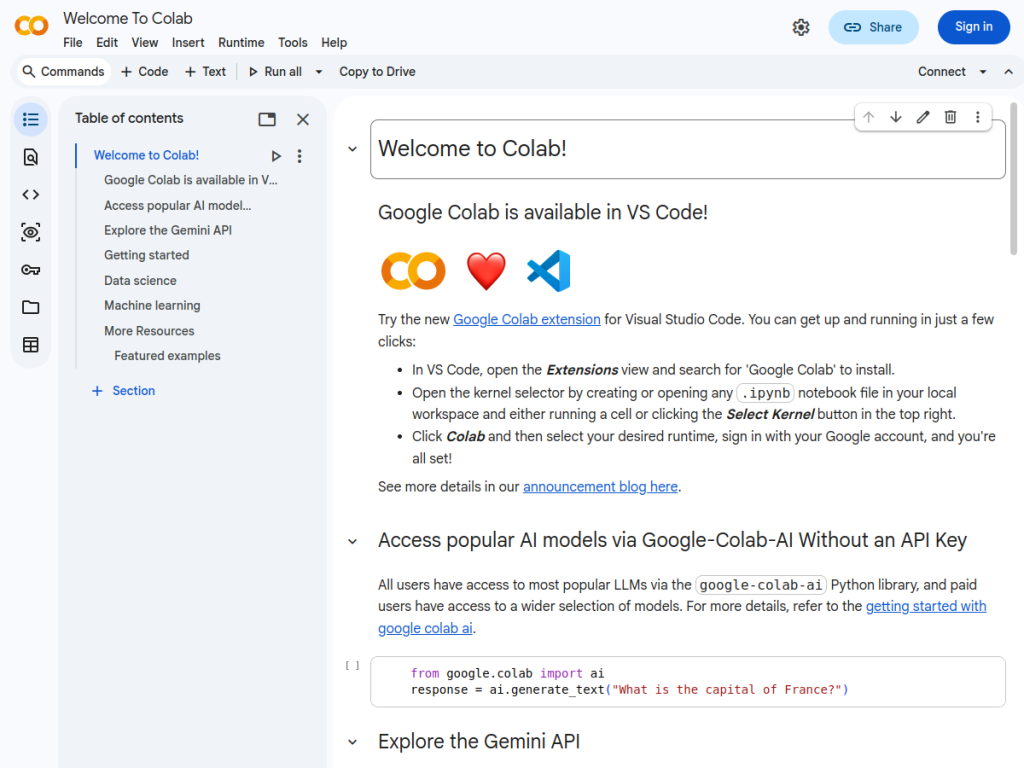
Google Colab (Colaboratory) is a hosted Jupyter notebook service from Google that lets you write and execute Python in the browser with no installation or configuration. Its standout is free access to cloud compute, including GPUs and TPUs, which makes it popular for machine learning, data analysis, and deep-learning experimentation that would otherwise require expensive local hardware. Notebooks mix code, output, and rich text, and are easy to share and collaborate on, similar to Google Docs. Colab integrates AI coding assistance powered by Gemini to help write, complete, and explain code, and it connects with Google Drive for saving work. It is widely used for teaching, research, prototyping, and running open-source ML projects. Colab is free to use with usage limits, and paid Colab Pro and Pro+ tiers (plus pay-as-you-go compute) add faster GPUs, more memory, and longer runtimes.
What it does well
- No setup: run Python and ML code in the browser instantly.
- Free compute: access to GPUs and TPUs at no cost.
- AI assistance: Gemini-powered code help built in.
- Shareable: collaborative, Google Drive-connected notebooks.
Who it is for
Google Colab fits data scientists, machine-learning practitioners, students, educators, and researchers who want a zero-setup place to write Python, experiment with models, and access GPUs or TPUs without buying hardware. It is ideal for learning, prototyping, and running shared notebooks. Teams needing guaranteed, always-on production infrastructure will use dedicated cloud services, and the free tier has usage limits, but for accessible, AI-assisted data science and ML in the browser, Google Colab is an excellent, widely used choice.
Things to keep in mind
- The free tier has usage limits and can disconnect idle sessions.
- Guaranteed resources and longer runtimes require Pro or Pro+.
- It is for experimentation and learning, not always-on production hosting.
Our verdict
Google Colab is a beloved, zero-setup environment for Python, data science, and machine learning, and its free access to GPUs and TPUs makes serious ML experimentation possible without expensive hardware. Shareable Jupyter notebooks and built-in Gemini AI coding assistance make it even more productive for learning, prototyping, and research. The free tier has limits and it is not meant for always-on production, but for accessible, AI-assisted coding and machine learning in the browser, Google Colab is an outstanding, free-to-start choice.
Frequently asked questions
What is Google Colab?
Google Colab is a hosted Jupyter notebook service that lets you write and run Python in the browser with no setup, including free access to GPUs and TPUs.
Is Google Colab free?
Yes, Colab is free to use with usage limits; paid Colab Pro and Pro+ tiers and pay-as-you-go compute add faster GPUs, more memory, and longer runtimes.
Does Colab have AI features?
Yes, Colab integrates AI coding assistance powered by Gemini to help write, complete, and explain code.
Who uses Google Colab?
Data scientists, ML practitioners, students, educators, and researchers use it for learning, prototyping, and running notebooks with free GPU/TPU access.
Top Google Colab alternatives
Other hand-reviewed Coding Assistants tools worth comparing against Google Colab.
AiderFree
Aider is a free AI coding assistant and developer tool tool for software developers. Our review covers what…
AlphaCodeFree
AlphaCode by Google DeepMind is a free AI coding assistant and developer tool tool for software developers. Our…
Amazon Q DeveloperFreemium
Amazon Q Developer by Amazon Web Services is a freemium AI business and coding assistant tool for software…
AnacondaFree
Anaconda is a free AI coding assistant and developer tool tool for engineers. Our review covers what it…
ApplitoolsPaid
Applitools is a paid AI coding assistant and developer tool tool for engineers. Our review covers what it…
AskCodiFreemium
AskCodi is a freemium AI coding assistant and developer tool tool for software developers. Our review covers what…
Are you the maker of Google Colab?
Show visitors this review with the badge below. Copy the code into your site or press kit; it links straight back to this page.