
Key Takeaways
- ChatPDF lets you upload a PDF and ask questions about it in plain language.
- It answers with citations linked to the source, summarises, and handles many formats.
- Aimed at students, researchers, and professionals working through long documents.
- Verify important answers against the source — AI can still misread or miss context.
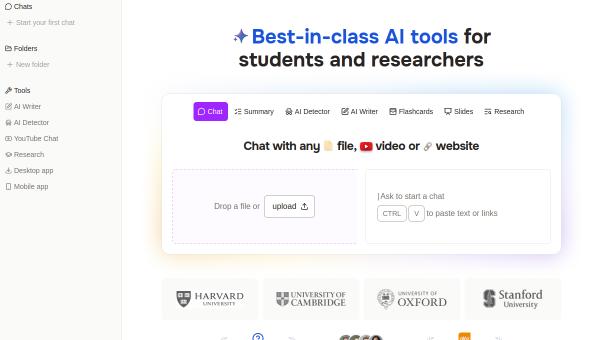
ChatPDF is one of the most popular “chat with your document” tools, letting you upload a PDF and ask questions about it as if you were messaging ChatGPT. Instead of reading a long report or paper end to end, you can ask what you need to know and get answers with citations back to the source. For anyone who works through dense documents, it is a real time-saver.
What is ChatPDF?
ChatPDF is an AI platform for conversational interaction with documents. You upload a PDF (or Word, PowerPoint, Markdown, or text file) and ask questions, get summaries, or extract information, with answers citing and linking to the original content. It supports multi-file conversations in folders, works across languages, offers a side-by-side chat-and-document view, and stores documents securely.
What it does well
- Chat with documents — ask questions and get answers in plain language.
- Cited answers — responses link back to the source content.
- Summaries — condense long documents quickly.
- Multi-format and multi-file — PDFs, Office files, and folders of documents.
- Side-by-side view — see the chat and the document together.
Who it is for
ChatPDF suits students studying or completing assignments, researchers analysing papers, and professionals reviewing contracts, reports, and manuals. It is especially useful for anyone who needs to quickly find or understand specific information in a long document without reading the whole thing.
Things to keep in mind
AI can misread, oversimplify, or occasionally hallucinate, so verify important answers against the source — the citations make this easier, and you should use them. For legal, financial, or high-stakes documents especially, treat ChatPDF as a fast way to navigate and understand, not as a substitute for careful reading of what matters.
Our verdict
ChatPDF is a genuinely useful tool for anyone who works through long documents, and its cited answers and clean side-by-side view make it one of the better “chat with your PDF” options. Use it to find and understand information quickly, verify important answers against the cited source, and it becomes a real accelerator for studying, research, and document review.
Frequently asked questions
Does ChatPDF cite its answers?
Yes — its answers include citations linked to the original content, so you can check where each response came from, which is important for verifying accuracy.
What files can ChatPDF handle?
PDFs plus other formats like Word, PowerPoint, Markdown, and text, and it supports multi-file conversations in folders and works across multiple languages.
Reviewed by the World of AI Hub editorial team based on hands-on use and the tool documentation.
Top ChatPDF alternatives
Other hand-reviewed PDF Tools tools worth comparing against ChatPDF.
Adobe Acrobat AIFreemium
Adobe Acrobat AI is a freemium AI business and ocr tool for document-heavy teams. Our review covers what…
Foxit PDF EditorPaid
Foxit PDF Editor is a paid AI business and ocr tool for document-heavy teams. Our review covers what…
iLovePDFFreemium
iLovePDF is a freemium AI pdf-tool and productivity tool for document-heavy teams. Our review covers what it does,…
LightPDFFreemium
LightPDF is a freemium AI pdf-tool and productivity tool for document-heavy teams. Our review covers what it does,…
Nitro PDFPaid
Nitro PDF is a paid AI pdf-tool and productivity tool for document-heavy teams. Our review covers what it…
OCR.spaceFreemium
OCR.space is a freemium AI developer tool and ocr tool for operations teams. Our review covers what it…
Are you the maker of ChatPDF?
Show visitors this review with the badge below. Copy the code into your site or press kit; it links straight back to this page.



