Key Takeaways
- Expensify is an all-in-one expense management platform with AI assistance.
- Its Concierge AI categorizes expenses, flags policy violations, and enforces rules.
- Features include receipt scanning, corporate cards, bill pay, invoicing, and travel.
- Great for streamlining expenses; free for individuals, low cost per member for teams.
Expensify makes tracking receipts and managing expenses close to effortless, and it uses AI to take even more work off your plate. Its Concierge AI automatically categorizes expenses, flags policy violations, and enforces company rules — so both employees submitting expenses and finance teams approving them spend far less time on manual busywork.
What is Expensify?
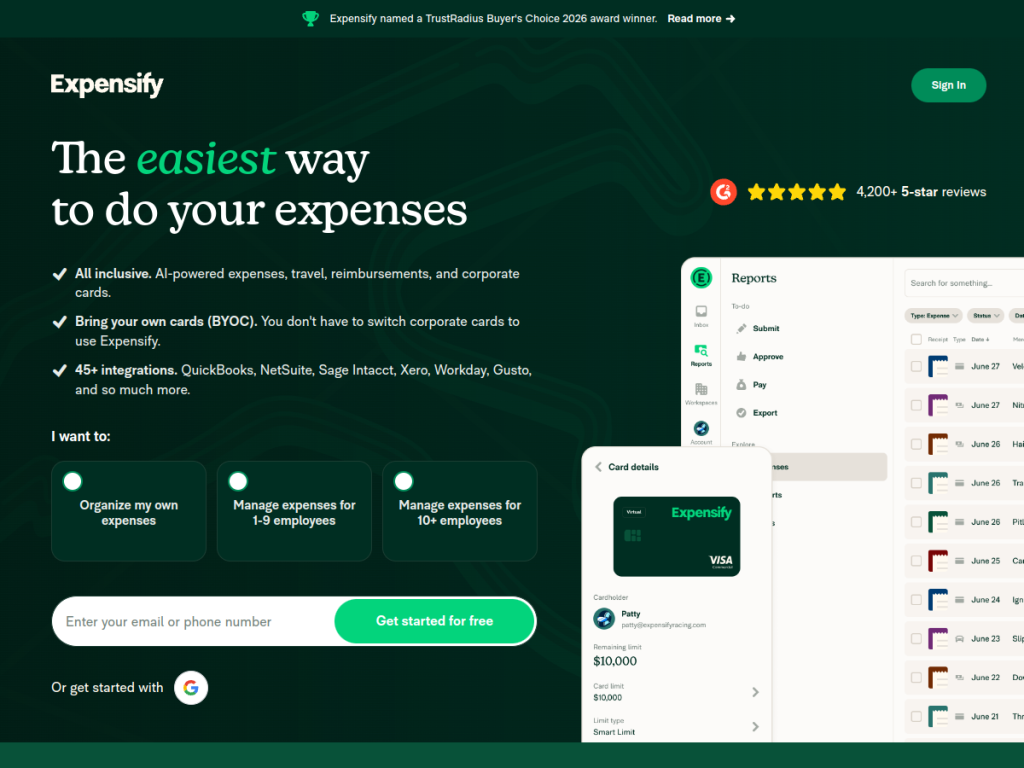
Expensify is an all-in-one expense management platform that lets users track receipts, manage expenses, and handle reimbursement in a few clicks. Its AI, Concierge, automatically categorizes expenses, flags policy violations, enforces company rules, reduces manual errors, and can intelligently filter reports to highlight outliers for approval. Beyond expenses, it offers receipt scanning (SmartScan), corporate card management, travel booking, bill pay, and invoicing, and it integrates with 45-plus accounting and business platforms including QuickBooks, NetSuite, Xero, and Workday. Individual use is free, company plans start around $5 per member per month — potentially offset by cash back on the Expensify Card — and a 30-day free trial is available. It carries strong ratings and industry recognition.
What it does well
- AI automation: Concierge categorizes expenses and enforces policy automatically.
- Receipt scanning: SmartScan captures receipts with minimal effort.
- Broad feature set: cards, bill pay, invoicing, and travel in one platform.
- Wide integrations: connects to 45+ accounting and business tools.
Who it is for
Expensify fits individuals wanting free, simple expense tracking and businesses of all sizes that need to manage employee expenses, corporate cards, and reimbursements efficiently. Its AI is especially valuable for finance teams enforcing policy and approving reports at scale. Very large enterprises with highly specialized procurement needs may evaluate dedicated spend-management suites, but for most individuals and companies, Expensify offers an easy, affordable, well-integrated solution.
Things to keep in mind
- AI categorization is helpful but still benefits from occasional human review.
- Costs scale with the number of members on company plans.
- Getting full value means connecting it to your accounting and card systems.
Our verdict
Expensify remains a leading expense-management tool, and its Concierge AI meaningfully cuts the manual work of categorizing expenses and enforcing policy. With receipt scanning, corporate cards, bill pay, invoicing, and broad accounting integrations, it covers the whole expense lifecycle in one place. AI still wants an occasional human check, and team costs scale per member, but with free individual use and an affordable, low per-member price for companies, Expensify is an easy recommendation for streamlining expenses.
Frequently asked questions
What is Expensify?
Expensify is an all-in-one expense management platform for tracking receipts, managing expenses, and handling reimbursement, with AI (Concierge) that automates categorization and policy enforcement.
What does Expensify’s AI do?
Concierge AI automatically categorizes expenses, flags policy violations, enforces company rules, reduces errors, and highlights outlier reports for approval.
Is Expensify free?
Individual use is free. Company plans start around $5 per member per month, potentially offset by Expensify Card cash back, with a 30-day free trial.
What does Expensify integrate with?
It integrates with 45+ accounting and business platforms, including QuickBooks, NetSuite, Xero, and Workday.
Top Expensify alternatives
Other hand-reviewed Finance tools worth comparing against Expensify.
AdyenPaid
Adyen is a paid AI business and finance tool for finance professionals. Our review covers what it does,…
Bloomberg Terminal AIEnterprise
Bloomberg Terminal AI is an enterprise AI business and data analysis tool for finance professionals. Our review covers…
BrexFree
Brex is a free AI business and finance tool for finance professionals. Our review covers what it does,…
DatarailsPaid
Datarails is a paid AI business and data analysis tool for finance professionals. Our review covers what it…
FreshBooksPaid
FreshBooks is a paid AI business and finance tool for finance professionals. Our review covers what it does,…
KavoutPaid
Kavout is a paid AI business and finance tool for finance professionals. Our review covers what it does,…
Are you the maker of Expensify?
Show visitors this review with the badge below. Copy the code into your site or press kit; it links straight back to this page.



