Key Takeaways
- Notion is an all-in-one workspace for docs, wikis, projects, and databases.
- Notion AI adds writing help, Q&A, enterprise search, meeting notes, and agents.
- It centralizes knowledge and work, now with AI that acts across your content.
- Excellent for teams and individuals; flexibility brings a setup learning curve.
Notion is one of the most popular workspaces for organizing notes, documents, wikis, projects, and databases in one flexible place. It has woven AI throughout as Notion AI — helping you write, answering questions across your workspace and connected apps, taking meeting notes, and even running tasks as an agent — turning a beloved organization tool into an AI-powered hub for work.
What is Notion?
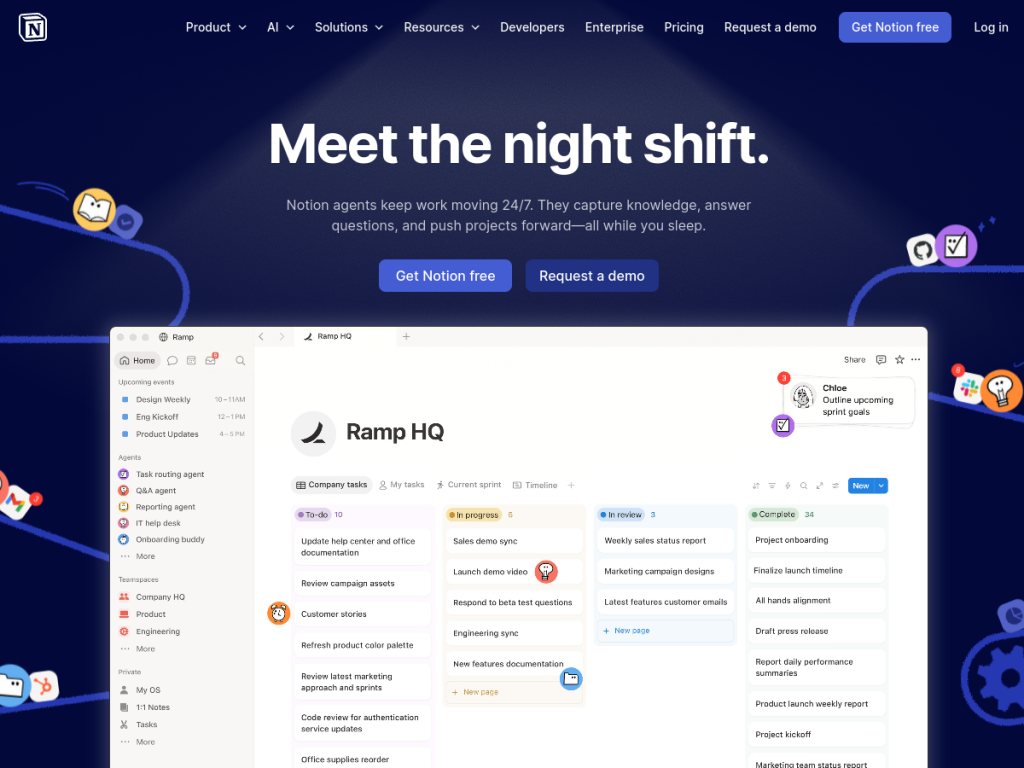
Notion is an all-in-one workspace that combines documents, wikis, notes, project management, and databases, used by over a hundred million people and a majority of the Fortune 100. Its building-block approach lets teams and individuals shape it into almost any workflow. Notion AI adds a suite of capabilities: AI writing and editing; enterprise search that spans Notion and connected tools like Slack, Google Drive, and Jira; AI meeting notes that transcribe and summarize; custom agents that automate repetitive tasks such as Q&A, task routing, and report generation; and a Notion Agent that can handle assigned tasks more autonomously. It is highly rated for knowledge bases, AI enterprise search, and AI writing. Notion offers a free plan for individuals and small teams, with paid plans that scale by features and users and enterprise tiers for security and administration.
What it does well
- Flexible all-in-one: docs, wikis, projects, and databases together.
- Notion AI: writing help, enterprise search, meeting notes, and agents.
- Connected search: answers across Notion and integrated apps.
- Free to start: a capable free plan for individuals and small teams.
Who it is for
Notion suits individuals, teams, and organizations that want a single, flexible place to organize knowledge and run projects — now with AI that writes, searches, and automates across their content. It is especially valuable to teams building wikis and workflows who want AI grounded in their own workspace. Those wanting a rigid, out-of-the-box tool may find its flexibility requires setup, but for adaptable, AI-powered organization, Notion is a leading choice.
Things to keep in mind
- Its flexibility means teams invest time to set it up well.
- AI features work best when your workspace and connected tools are well organized.
- Advanced AI, security, and admin features sit on higher-tier plans.
Our verdict
Notion remains a top all-in-one workspace, and Notion AI is a substantive addition rather than a gimmick: because it searches and acts across your actual workspace and connected apps, its writing help, meeting notes, enterprise search, and agents are genuinely grounded and useful. There is a setup learning curve that comes with its flexibility, and the best AI features are on paid plans, but for individuals and teams that want to organize knowledge and work with AI woven in, Notion is an excellent choice with a strong free plan.
Frequently asked questions
What is Notion?
Notion is an all-in-one workspace combining documents, wikis, notes, projects, and databases, with Notion AI woven throughout.
What can Notion AI do?
Notion AI offers writing and editing help, enterprise search across Notion and connected apps, AI meeting notes, and custom agents that automate tasks.
Is Notion free?
Yes, Notion has a free plan for individuals and small teams, with paid plans adding features per user and enterprise tiers for security and administration.
Does Notion AI search other apps?
Yes. Notion AI’s enterprise search can span Notion and integrated tools like Slack, Google Drive, and Jira.
Top Notion alternatives
Other hand-reviewed Productivity tools worth comparing against Notion.
Abnormal SecurityPaid
Abnormal Security by Abnormal AI is a paid AI business and productivity tool for business teams. Our review…
Adobe Acrobat AIFreemium
Adobe Acrobat AI is a freemium AI business and ocr tool for document-heavy teams. Our review covers what…
AirtableFreemium
Airtable is a freemium AI business and productivity tool for knowledge workers. Our review covers what it does,…
AlmanacPaid
Almanac is a paid AI business and productivity tool for knowledge workers. Our review covers what it does,…
AsanaFreemium
Asana is a freemium AI business and productivity tool for knowledge workers. Our review covers what it does,…
Automation AnywherePaid
Automation Anywhere is a paid AI business and productivity tool for business teams. Our review covers what it…
Notion vs the competition
Are you the maker of Notion?
Show visitors this review with the badge below. Copy the code into your site or press kit; it links straight back to this page.