Key Takeaways
- Supabase is an open-source backend platform built on Postgres.
- It provides a database, auth, storage, and edge functions.
- Its Vector product (pgvector) powers AI apps with embeddings.
- Great for developers building apps, including AI-powered ones.
Supabase is a popular open-source backend platform — often described as an open-source Firebase alternative — built on the rock-solid foundation of PostgreSQL. It gives developers a database, authentication, storage, real-time features, and serverless functions out of the box, without vendor lock-in. Crucially for modern development, it also supports AI apps: its Vector product stores and queries embeddings right alongside your data. For developers building apps, including AI-powered ones, Supabase is a fast, flexible foundation.
What is Supabase?
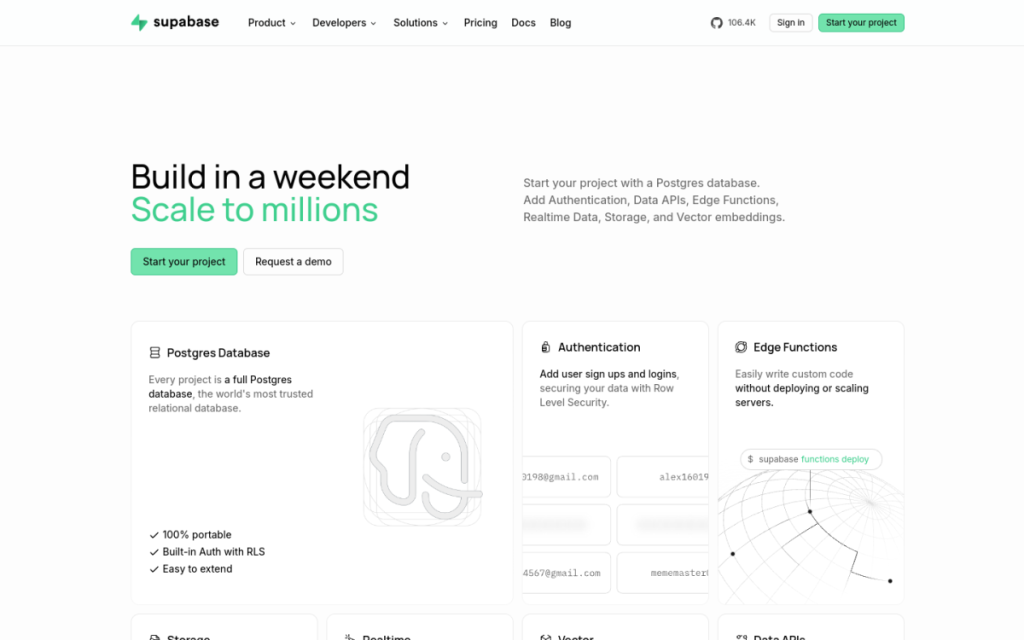
Supabase is an open-source Firebase alternative built on Postgres, providing a complete backend platform on industry-standard PostgreSQL so you avoid vendor lock-in and can self-host. Its core features include a dedicated Postgres database with auto-generated REST and GraphQL APIs, built-in authentication and user management with 20-plus social login providers, S3-compatible storage with a global CDN, serverless edge functions (TypeScript/Deno), and real-time WebSocket synchronization. For AI, its Vector product is powered by pgvector for storing, indexing, and querying vector embeddings alongside transactional data in Postgres — letting developers build AI-powered applications (like semantic search and retrieval) directly on their database — and it offers an AI assistant to help work in the platform. Supabase is available across many global regions with SOC 2 Type 2 compliance. It offers a free tier and paid plans (Pro and up) that scale by usage and features.
What it does well
- Postgres-based: powerful, standard, no lock-in.
- Complete backend: database, auth, storage, and functions.
- AI-ready: pgvector embeddings for AI apps.
- Open-source: self-host or use the managed cloud.
Who it is for
Supabase fits developers, startups, and teams building web and mobile apps who want a fast, open-source backend on Postgres — database, auth, storage, real-time, and functions — without lock-in, and who increasingly need to build AI features like semantic search and retrieval using vector embeddings. Its free tier and developer experience make it great for prototyping and scaling. Non-developers will use apps built on it rather than the platform directly, and self-hosting takes operational effort, but for building apps (including AI apps) on an open, Postgres-based backend, Supabase is an excellent, free-to-start choice.
Things to keep in mind
- It is a developer platform, not a finished end-user app.
- Self-hosting takes operational effort versus the managed cloud.
- Heavier usage and features move to paid plans.
Our verdict
Supabase is an excellent open-source backend platform, and its Postgres foundation is its strength: a real, standard database with auto-generated APIs, plus built-in auth, storage, real-time sync, and edge functions — all without vendor lock-in and with the option to self-host. Its Vector product (pgvector) makes it genuinely AI-ready, letting developers build semantic search and retrieval right on their data, and an AI assistant smooths the workflow. It is a developer platform and self-hosting takes effort, but for building apps and AI apps on an open backend, Supabase is a top, free-to-start choice.
Frequently asked questions
What is Supabase?
Supabase is an open-source backend platform built on Postgres, providing a database, authentication, storage, real-time sync, and serverless functions — an open-source Firebase alternative.
How does Supabase support AI?
Its Vector product uses pgvector to store, index, and query vector embeddings alongside your data in Postgres, enabling AI apps like semantic search and retrieval, plus an AI assistant.
Is Supabase free?
Supabase offers a free tier and paid plans (Pro and up) that scale by usage and features, and is open-source so you can self-host.
Who is Supabase for?
It is for developers, startups, and teams building web and mobile apps — including AI-powered apps — who want an open, Postgres-based backend without lock-in.
Top Supabase alternatives
Other hand-reviewed Coding Assistants tools worth comparing against Supabase.
AiderFree
Aider is a free AI coding assistant and developer tool tool for software developers. Our review covers what…
AlphaCodeFree
AlphaCode by Google DeepMind is a free AI coding assistant and developer tool tool for software developers. Our…
Amazon Q DeveloperFreemium
Amazon Q Developer by Amazon Web Services is a freemium AI business and coding assistant tool for software…
AnacondaFree
Anaconda is a free AI coding assistant and developer tool tool for engineers. Our review covers what it…
ApplitoolsPaid
Applitools is a paid AI coding assistant and developer tool tool for engineers. Our review covers what it…
AskCodiFreemium
AskCodi is a freemium AI coding assistant and developer tool tool for software developers. Our review covers what…
Are you the maker of Supabase?
Show visitors this review with the badge below. Copy the code into your site or press kit; it links straight back to this page.



