Key takeaways
- Adalo is a no-code app builder for creating native iOS, Android and web apps from a visual drag-and-drop canvas.
- It includes a hosted database, an AI assistant (“Ada”) for prompt-based building, and publishing to the App Store, Google Play and the web.
- It suits entrepreneurs, startups and non-technical makers who want a real app without hiring developers.
- Complex or high-scale apps can hit performance and flexibility limits — it is best for straightforward, database-driven apps.
What Adalo is
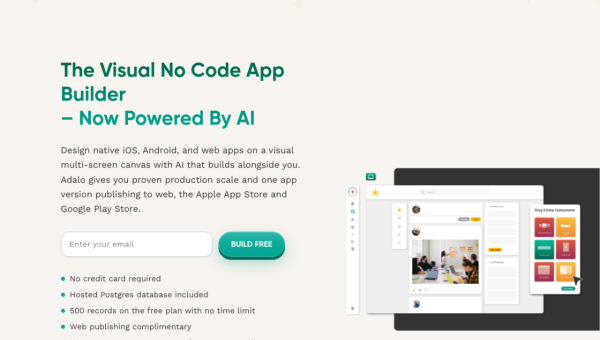
Adalo is a no-code development platform for building mobile and web applications without writing code. You assemble screens on a visual canvas by dragging components — lists, forms, buttons, images — and connect them to a database and actions. Unlike website builders, Adalo produces database-driven apps with real user accounts, records and logic, and can publish native apps to the Apple App Store and Google Play as well as a responsive web app. A hosted Postgres database is included, so you don’t manage backend infrastructure.
The platform targets people who have an app idea but not a development team: founders validating a concept, small businesses building internal tools, agencies delivering client apps, and hobbyists. Its promise is turning an idea into a working, publishable app in days rather than months.
The AI assistant and building experience
Adalo has added an AI assistant, “Ada,” that lets you generate and edit app components through natural-language prompts, lowering the barrier for people new to the builder. Alongside the AI, the platform offers feature templates for scheduling, payments and messaging, a component marketplace, and thousands of integrations through Zapier, Make and native connectors such as Stripe and Airtable.
The AI assistant is a helpful accelerant for getting started and making quick changes, but as with most no-code AI it works best on well-defined, common patterns — you still need to understand Adalo’s model of screens, collections and actions to build something real. The heart of the product remains the visual builder and database; Ada speeds up the parts you already understand rather than replacing the design work.
Strengths and limits
The strengths are genuine native-app publishing, an included database, and a broad component and integration ecosystem, all accessible to non-coders. For straightforward, data-driven apps — directories, booking tools, community apps, simple marketplaces — Adalo can take you from idea to app-store listing without a developer, which is its real value.
The limits appear as ambitions grow. Complex logic, heavy data volumes or demanding performance can strain a no-code app, and users report slowdowns and flexibility ceilings on larger projects. Costs rise with the paid plans needed for app-store publishing and scale, and you are building within Adalo’s ecosystem, which means some lock-in. It is excellent for its target range and less suited to apps that must scale into complex, high-traffic products.
Who it suits
- Founders and non-technical makers validating an app idea quickly.
- Small businesses and agencies building straightforward, database-driven apps.
- Teams that need native App Store and Google Play publishing without developers.
Verdict
Adalo is a capable no-code platform for turning an idea into a real, publishable mobile or web app without writing code. Its combination of a visual builder, an included database, native App Store and Google Play publishing, and now an AI assistant makes it genuinely accessible to non-technical makers. The honest caveat is scope: it shines for straightforward, database-driven apps and can hit performance and flexibility limits as complexity grows, while app-store publishing and scale require paid plans. For founders, small businesses and agencies building focused apps, it is one of the more approachable and complete no-code options; for complex, high-scale products, expect to outgrow it.
Top Adalo alternatives
Other hand-reviewed No-Code tools worth comparing against Adalo.
10WebPaid
10Web is a paid AI no code and website builder tool for founders and small businesses. Our review…
Bravo StudioFreemium
Bravo Studio is a freemium AI no code and website builder tool for non-technical builders. Our review covers…
BubbleFreemium
Bubble is a freemium AI business and no code tool for non-technical builders. Our review covers what it…
FlutterFlowPaid
FlutterFlow is a paid AI no code and website builder tool for founders and small businesses. Our review…
Framer AIFreemium
Framer AI is a freemium AI business and design tool for founders and small businesses. Our review covers…
GlidePaid
Glide is a paid AI no code and website builder tool for non-technical builders. Our review covers what…
Are you the maker of Adalo?
Show visitors this review with the badge below. Copy the code into your site or press kit; it links straight back to this page.



