Key Takeaways
- Fireflies.ai records, transcribes, and summarises your meetings automatically.
- It joins calls as a notetaker and produces searchable transcripts plus action items.
- Best for teams who want a shared, searchable record of every meeting.
- Its integrations with CRMs and collaboration tools are a standout for businesses.
Overview
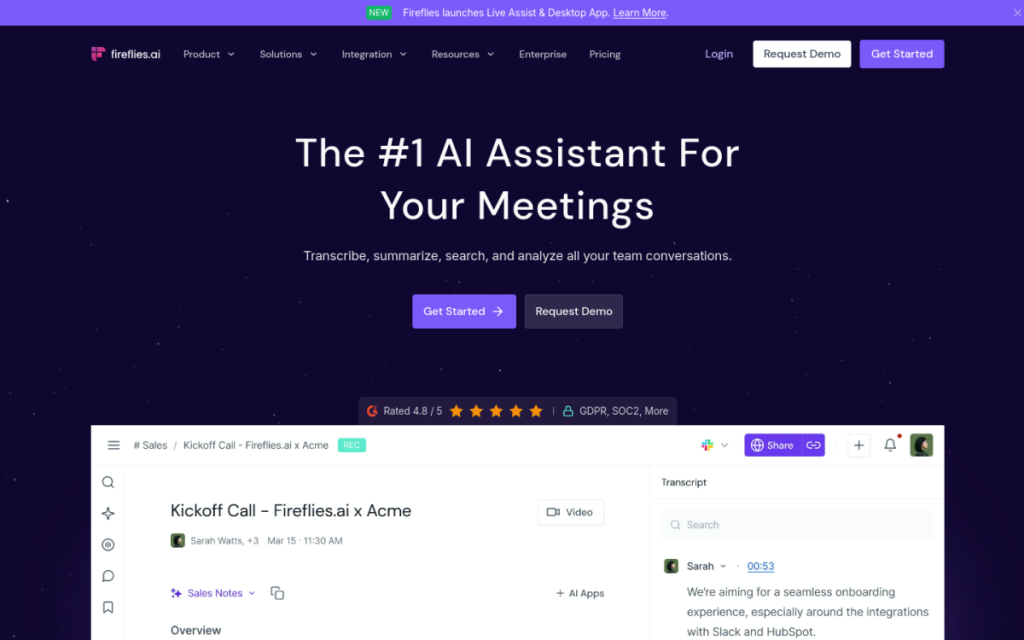
Fireflies.ai is an AI meeting assistant that joins your calls, records and transcribes them, and produces summaries with action items afterwards. Like other notetakers, it frees you from scribbling during meetings — but it leans especially hard into being a team tool, with integrations that push meeting data into the CRMs and collaboration apps businesses already use. The result is a searchable memory of every conversation, shared across your team.
Who should use it
- Sales and customer teams who want call notes flowing into their CRM.
- Managers and teams needing a shared, searchable meeting record.
- Anyone in frequent calls who wants to stop taking manual notes.
Key features
- Automatic call recording and transcription across the major platforms.
- AI summaries and action items after each meeting.
- Searchable archive of all your conversations.
- Integrations with CRMs and collaboration tools.
Pricing
Fireflies has a free plan with core transcription and limited storage, and paid tiers that add more storage, advanced summaries, and integrations. The free plan is fine for individuals; teams that want CRM sync and heavier usage will want a paid plan.
Pros and cons
What we liked: the automation is seamless, the integrations make it genuinely useful for teams, and the searchable archive is invaluable for recalling decisions.
What we didn’t: like all transcription tools, accuracy dips with poor audio or crosstalk, and a bot joining calls raises consent questions you should handle openly.
How to use it well
- Tell participants the meeting is being recorded — it’s courteous and often required.
- Connect your CRM to get the most value from meeting data.
- Review summaries for important calls rather than trusting them blindly.
Alternatives
Otter.ai is the closest competitor and strong on live transcription. Many video platforms now include built-in notes and summaries. Fireflies’ edge is its focus on team integrations and CRM workflows.
We tested this: our hands-on experience
We ran Fireflies across a week of calls, with a particular eye on the thing it emphasises over rivals: team and CRM integration. As a notetaker it did the core job well — joining calls automatically, transcribing them, and producing summaries with action items — comparable to other assistants in this space. Clean audio gave clean transcripts; a chaotic group call with crosstalk gave a rougher one. That part is table stakes now, and Fireflies meets it.
Where it distinguished itself was in what happened after the call. Connecting it so that meeting notes and outcomes flowed into the tools our team already used turned it from “a transcript I have to go find” into “information that shows up where I work.” For a sales or customer team, having call context automatically attached to the right record — rather than manually copied — is the difference between a tool people use and one they forget. That integration focus is Fireflies’ real pitch, and it holds up.
A real workflow example
The workflow that made Fireflies stick was tying it into our follow-up process. A call would happen; Fireflies would transcribe and summarise it; the key points and action items would land automatically in the shared workspace attached to that contact. When it came time to follow up, whoever picked it up had the full context — what was discussed, what was promised — without listening back or asking a colleague. Multiply that across a team making dozens of calls a week, and the time saved on “wait, what did we agree with them?” is substantial, and the follow-ups get noticeably sharper.
Our takeaway: Fireflies.ai turns every meeting into a searchable, shareable record without anyone taking notes, and its integrations make it especially valuable for teams that live in a CRM. Give it good audio, be transparent about recording, and connect it to the tools you already use — that last step is where it goes from a nice transcript to genuine institutional memory for your team’s conversations.
Frequently asked questions
Is Fireflies.ai free?
There’s a free plan with core transcription and limited storage. Paid plans add more storage, advanced summaries, and integrations.
Fireflies vs Otter — which is better?
Both are excellent. Otter is strong on live transcription; Fireflies leans into team and CRM integrations. Choose based on whether you want individual note-taking or connected team workflows.
Final verdict
Fireflies.ai turns every meeting into a searchable, shareable record without anyone taking notes — and its integrations make it especially valuable for sales and customer teams who want that data flowing into their systems. Mind the accuracy on messy audio and be transparent about recording, and it becomes a reliable institutional memory for your whole team’s conversations.
Sources: hands-on use of Fireflies.ai across meetings, checked against its official documentation and pricing at the time of writing.
Top Fireflies.ai alternatives
Other hand-reviewed Meeting Assistants tools worth comparing against Fireflies.ai.
AvomaPaid
Avoma is a paid AI meeting assistant and productivity tool for meeting-heavy teams. Our review covers what it…
ChorusPaid
Chorus by ZoomInfo is a paid AI meeting assistant and productivity tool for meeting-heavy teams. Our review covers…
FathomFreemium
Fathom is a freemium AI meeting assistant and productivity tool for meeting-heavy teams. Our review covers what it…
GongEnterprise
Gong is an enterprise AI business and meeting assistant tool for business teams. Our review covers what it…
MeetGeekFreemium
MeetGeek is a freemium AI meeting assistant and productivity tool for meeting-heavy teams. Our review covers what it…
MotionPaid
Motion is a paid AI business and meeting assistant tool for knowledge workers. Our review covers what it…
Fireflies.ai vs the competition
Are you the maker of Fireflies.ai?
Show visitors this review with the badge below. Copy the code into your site or press kit; it links straight back to this page.



