Key takeaways
- Routine is an all-in-one work-management app unifying tasks, calendar and notes in one AI-powered workspace.
- AI features include meeting notes that turn action items into tasks, AI agents for workflows, and a universal inbox.
- It offers quick capture, time-blocking, 26+ integrations and custom data models, across desktop, mobile and web.
- Best for founders, freelancers and small teams who want to consolidate several productivity tools into one.
What Routine is
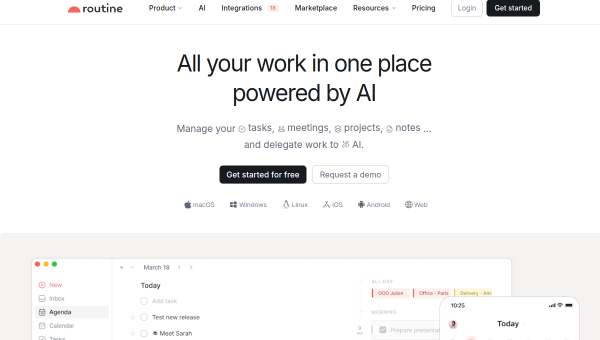
Routine is an all-in-one productivity app that consolidates the three things most knowledge workers juggle — tasks, calendar and notes — into a single, AI-powered workspace. Rather than switching between a to-do app, a calendar and a notes tool, Routine brings them together, with quick capture (a desktop hotkey to jot tasks instantly), time-blocking, a universal inbox that centralises tasks and notifications, and more than two dozen integrations. It runs across macOS, Windows, Linux, iOS, Android and the web.
Its pitch is consolidation: replace several tools with one and move faster. That targets founders, freelancers, startups and small teams who feel the drag of scattered productivity apps and want a unified system. The design leans toward speed and capturing things frictionlessly, then organising and scheduling them in one place.
The AI features
Routine’s AI includes meeting notes that automatically summarise conversations and convert action items into tasks across Google Meet, Zoom, Microsoft Teams, Discord and Slack — closing the common gap between a meeting and the follow-up work. Quick capture enriches new tasks with context, and the platform lets you deploy specialised AI agents to handle more complex workflows and automations. Custom data models let you define your own entities (customers, projects, candidates), extending it beyond generic task management.
The meeting-notes-to-tasks flow and AI agents are the standout features, turning Routine from a task app into something more automated. As with all AI note-taking, review the generated summaries and action items for accuracy before relying on them, and treat AI agents’ automated workflows with the usual oversight. The value is real, but the AI is an accelerator that still benefits from a human check.
Strengths and limits
The strengths are consolidation, speed and AI automation. Unifying tasks, calendar and notes with quick capture, a universal inbox and 26+ integrations genuinely reduces tool-switching, and the AI meeting notes and agents add automation on top. Broad platform support means it is available wherever you work.
The limits: all-in-one tools ask you to move your workflow into their world, which is a bigger commitment than a single-purpose app, and some may find it does not go as deep in any one area as a specialist tool. AI-generated notes and agent workflows need review. It is best for those willing to consolidate; for people happy with their existing separate tools, the switch may not be worth it.
Who it suits
- Founders, freelancers and small teams wanting one tool for tasks, calendar and notes.
- People who want AI meeting notes that automatically become tasks.
- Anyone looking to reduce tool-switching with quick capture and a universal inbox.
Verdict
Routine is a capable all-in-one AI work-management app that unifies tasks, calendar and notes, with genuinely useful AI — meeting notes that become tasks, deployable agents and a universal inbox. For founders, freelancers and small teams tired of switching between scattered productivity tools, its consolidation and automation are compelling, and broad platform support helps. It asks you to commit your workflow to one system, and its AI output needs review, but if you want to replace several tools with one AI-powered workspace, Routine is a strong, modern option.
Top Routine alternatives
Other hand-reviewed AI Productivity tools worth comparing against Routine.
AkiflowPaid
Akiflow is a paid AI productivity tool. Our hands-on review covers features, pricing, pros and cons, and who…
AmieFreemium
Amie is a freemium AI productivity tool. Our hands-on review covers features, pricing, pros and cons, and who…
Any doFree Trial
Any do by Any.do is a free trial AI productivity tool. Our hands-on review covers features, pricing, pros…
AudioPenPaid
AudioPen is a paid AI productivity tool. Our hands-on review covers features, pricing, pros and cons, and who…
BricksFree Trial
Bricks is a free trial AI productivity tool. Our hands-on review covers features, pricing, pros and cons, and…
CodaFree Trial
Coda is a free trial AI productivity tool. Our hands-on review covers features, pricing, pros and cons, and…
Are you the maker of Routine?
Show visitors this review with the badge below. Copy the code into your site or press kit; it links straight back to this page.